Why You Need JavaScript Closure
Starting from the Beginning
Closures let you access variables from an outer scope inside a function
But putting it this way is hard to understand. What is scope? To better understand closures, let’s start from the beginning. Usually, there are two ways to use variables inside a function:
- Method A: Pass variables into the function as parameters
- Method B: Define a variable inside the function
// Method Afunction add(a, b) {  return a + b;}
// Method Bfunction sayHello() {  const greeting = 'Hello';  return greeting;}
However, code outside a function cannot access variables inside that function. This is because a function creates a new scope, which makes the variables usable only within the function.
function sayHello() {  const greeting = 'Hello';  return greeting;}
console.log(greeting); // ReferenceError: greeting is not defined
But what happens if you directly use a variable from outside the function? It works! This is because, as mentioned earlier: “Closures let you access variables from an outer scope inside a function.” Closure is just a term used to describe this characteristic. It is JavaScript’s scope and underlying execution model that actually make closures possible.
const greeting = 'Hello';function sayHello() {  return greeting;}
console.log(sayHello()); // Still prints Hello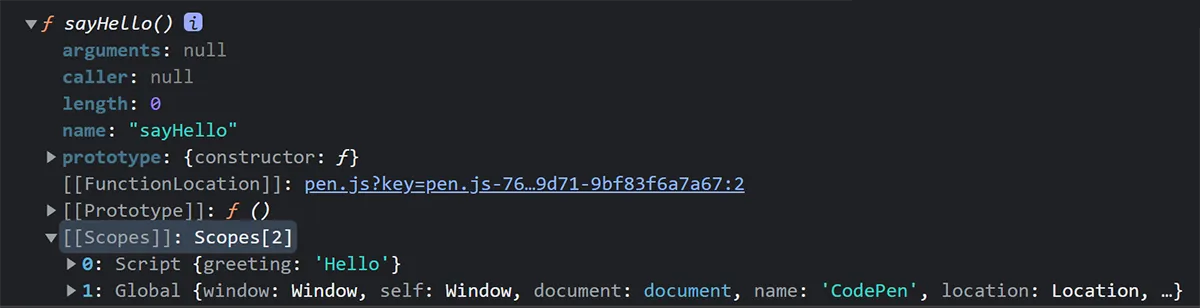
More specifically, you can use console.dir() to inspect the function. You will find that the sayHello function contains data from outside its own function scope, and this data can still be accessed even after the sayHello function has finished executing.
When Should You Use Closures?
Scopes outside the function continue to exist, even after the function has finished executing
Closures require more memory and computation, so it is best to use this feature only when you truly need it. Most of the time, closures are used in the following situations:
Creating Private Variables
Closures can prevent variables inside a function from being accessed by external code, so they can be used to create private variables.
function makeCounter() {  let count = 0; // External code cannot access this variable
  return function () {    return (count += 1);  };}
const counter = makeCounter();
console.log(counter()); // 1
Modularization
Closures can be used together with the factory pattern to modularize code and preserve state.
function makeCounter() {  let count = 0;
  return function () {    return (count += 1);  };}
const counterA = makeCounter();const counterB = makeCounter();
console.log(counterA()); // 1console.log(counterA()); // 2
console.log(counterB()); // 1console.log(counterB()); // 2