
Introduction
Previously we covered components and routing. Building a mostly static website should now be within your reach, and you can even leverage Astro’s powerful selective hydration to add dynamic parts to pages.
But ultimately writing a website should be about maintainability. Is it possible to update page content without touching code, simply by editing documents? In other words, separating content from layout and logic.
In this chapter we’ll learn Markdown and MDX to achieve that.
Markdown
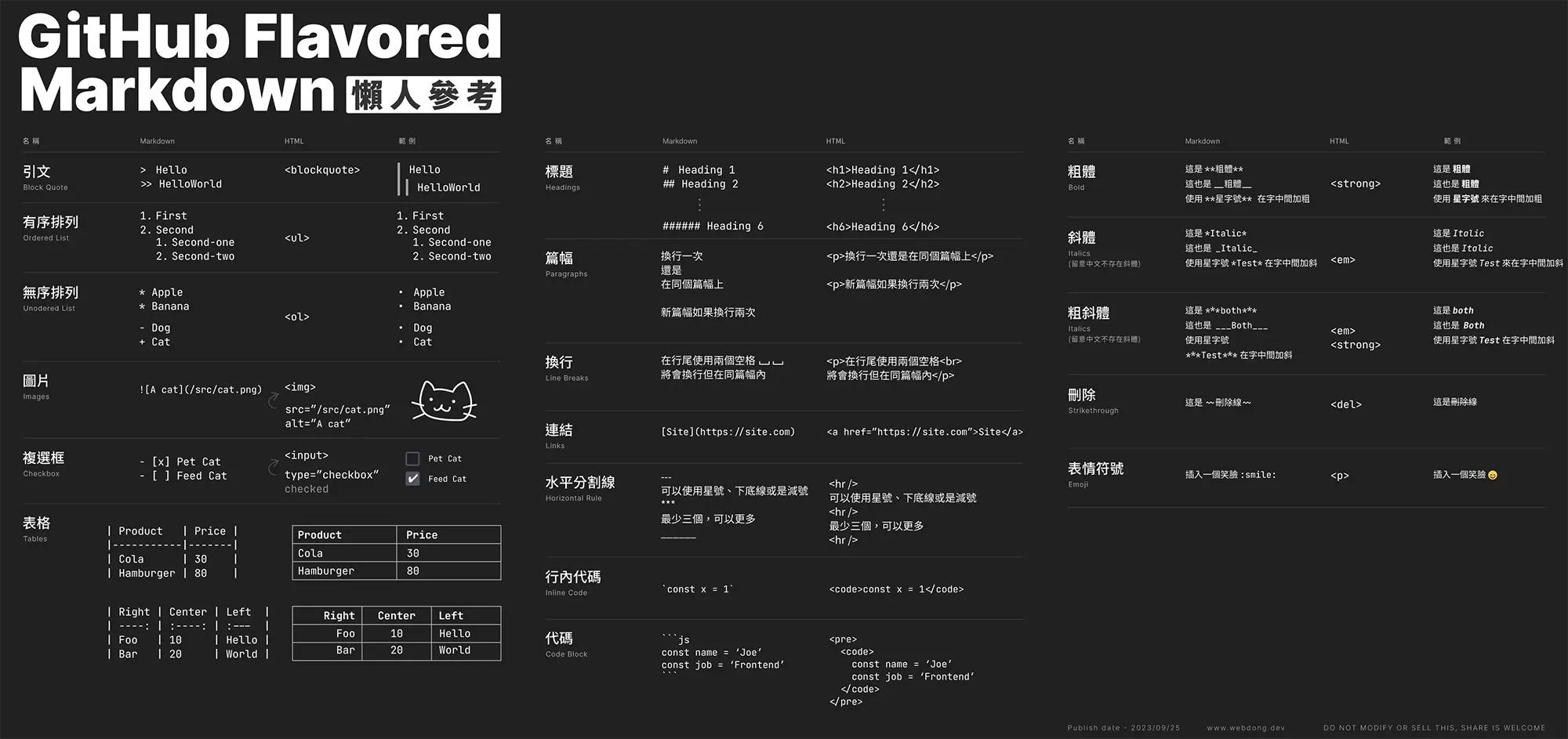
Markdown is a lightweight markup language you’ll often encounter in forums or note apps for writing documents. You can create .md files in src/pages and use them to write your webpages.
Besides writing page content, you can add YAML Frontmatter at the top of the file to record additional metadata such as title, author, date, category, etc.
---title: My first Markdownauthor: 'Joe'publishDate: '2023'category: 'other'---
# My first Markdown
You can add basic semantics using Markdown files, such as:
- **Bold** or _Italic_
- [Link](https://astro.build)
- 
- ……moreWriting Markdown is more lightweight than HTML and spares you many detailed concerns while keeping high flexibility.
MDX

You can add MDX support to Astro by installing the MDX integration described in the docs: https://docs.astro.build/en/guides/integrations-guide/mdx/. MDX is like a combination of Markdown and JSX. Plain Markdown might not be enough when you need to write more complex articles that include components or dynamic data — MDX is a great option for that. For example, my blog posts sometimes need to demonstrate React components, so MDX is a good fit.
Using exported variables and Frontmatter in MDX
You can render variables using {JSX expressions} and also access Frontmatter content.
export const title = 'MDX variable';
# {title}---subHeadline: 'My First MDX'---
# {frontmatter.title}Using components in MDX
You can import Astro components or components from other UI frameworks into MDX files — usage is the same as in .astro files!
------
import Button from '../components/Button.astro';import ReactCounter from '../components/ReactCounter.jsx';
The following button is an Astro element, imported into MDX:
<Button title="Contact me" />
The following is my counter element, imported into MDX:
<ReactCounter client:load />
Other features
Heading IDs
Headings will automatically generate IDs so you can link to sections within the document using <a> links.
## Introduction
This is the introduction. To jump directly to the conclusion, please refer to the [Summary] section (#Summary)
## Content
...
## Summary
...
Special characters
Some characters are interpreted as HTML or JavaScript code, such as < and {. It’s recommended to use HTML character entities instead, like < or {. See https://html.spec.whatwg.org/multipage/named-characters.html#named-character-references for reference.
Syntax highlighting
By default, Astro supports using Shiki or Prism for code syntax highlighting. You can show highlighted code via:
- Fenced code blocks in Markdown or MDX (`````)
- The built-in
<Code/>component - The built-in
<Prism />component
Shiki is used by default with the github-dark theme. All styles are injected inline, so there are no extra stylesheet files or client-side JavaScript required. Further configuration is covered in Chapter 4.
Additional plugins
Astro uses remark to process Markdown and applies GitHub-flavored Markdown and SmartyPants plugins by default. You can configure more plugins in Chapter 4 — see Markdown options in the configuration reference.
Conclusion
Get a feel for these two file formats. The next chapter will cover how to plan layouts for .md, .mdx, and even the whole site.
Finally, recommended hands-on practice:
- Create Markdown files under
/pagesand get familiar with the syntax by writing some articles. - Import your components into MDX (optional)
Further reading
- Markdown & MDX - Astro DOCS
- Day13 - Markdown & MDX - Same article also posted on the iThome Ironman contest site